Converse for Confluence and Jira

Why Converse?

Documentation
For teams that already think in Confluence pages and Jira issues — Converse turns the conversations between those two worlds into first-class work.

The problem you actually have

Your team is making real decisions every day. About specs. About priorities. About which Jira tickets to open and close. About which "draft" Confluence page is actually the spec and which one is the abandoned first try.

But the conversations driving those decisions are scattered:

Two weeks later somebody asks "why did we do X again?" — and nobody can find the conversation that produced the decision. The Jira ticket that came out of it has no link back to the why. The Confluence spec that documented it has no link to the discussion. The decision is real. The trail is gone.

What Converse does differently

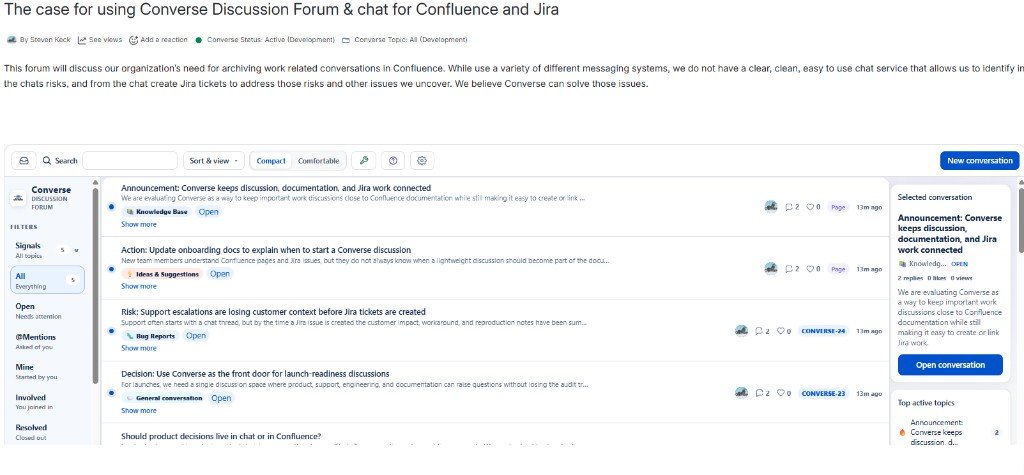
Converse runs natively inside Confluence as a Forge app. Every conversation is anchored to the Confluence page it belongs to. Every conversation can link directly to the Jira issues it produces. That means:

Conversations live where the work lives

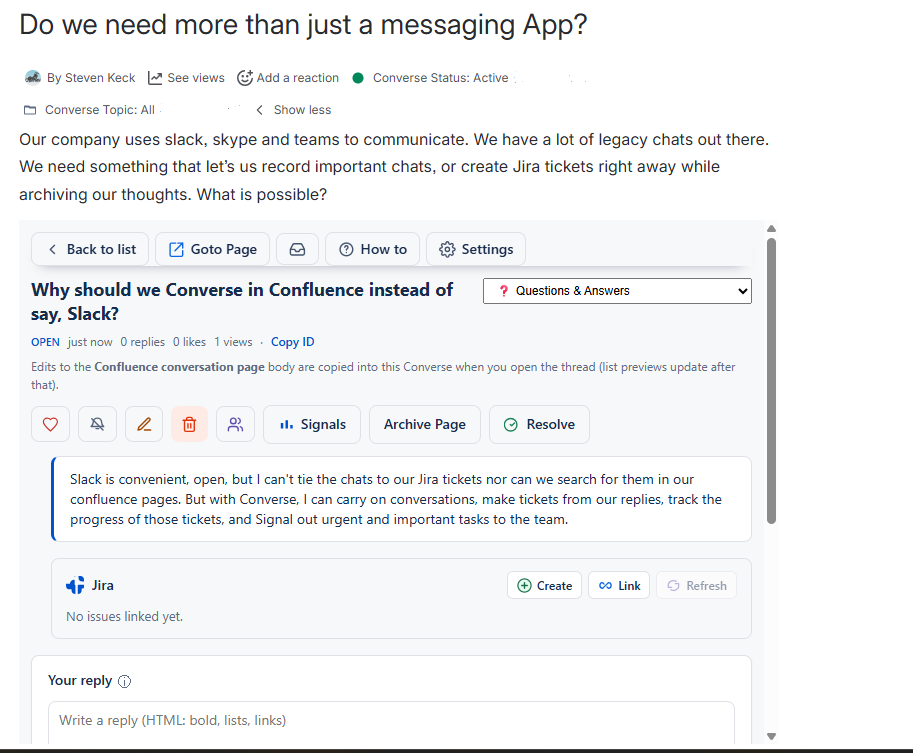
Open a Confluence spec, and the conversation about that spec is right there — on the same page, not buried in a channel three apps away. Anyone reading the page sees the thread. Anyone reading the thread sees the page. The page body is mirrored into the conversation automatically, so the spec and the discussion stay in sync without anyone copy-pasting.

Cross-product to Jira, natively

This is the part most Confluence forum tools can't touch.

  • See your linked conversation thread inside any Jira issue's side panel — title, preview, reply count, all without leaving the issue.
  • Create or link a Jira issue from any reply, in one click, without leaving the conversation.
  • Add a "Start a Converse topic" option to your Jira Global Issue Create screen, so new issues spawn linked discussions from the moment they're filed.

A decision in Confluence becomes a Jira ticket. The Jira ticket becomes a status update in the conversation. The conversation Resolves when the ticket closes. The trail is intact — both directions, all the time.

Signals for the urgent stuff

Not every message is an interrupt. When something actually is — a directive, a request, a blocker — Signal it. Push a specific reply to the specific people who need to act, rather than spraying a Slack channel and hoping the right person scrolls back. Signals show up in the conversation as a tracked event, not just a notification you'll miss.

Lifecycle controls baked in

A conversation has a status — Open, Resolved, Archived — the same way a Jira issue does. When a decision is made, Resolve it. When a thread is no longer relevant, Archive it. The history never disappears; it just stops cluttering everyone's view. Mute notifications on threads you don't need to follow.

Status visible on the page byline

Conversation status and category appear as chips on the Confluence page byline itself. You can even filter out all but the category you need to see. No more scanning through conversations that aren't in the category you need to use. Anyone scanning the page knows what's happening before they scroll into the thread. No more "is this still open?" pings.

Searchable like the rest of Confluence

Each conversation is stored as a child Confluence page, so every reply, every quoted decision, every linked Jira ticket — all of it shows up in the same Confluence search bar your team already uses. There's no separate forum search to learn, no new index to wait on, no second search engine to maintain.

Forge-native, with no external servers

All conversation data stays inside Atlassian's cloud — no third-party servers, no external data egress, no extra vendor for IT to review. Personally identifiable information is redacted from logs by default. The app inherits Atlassian Cloud's data residency for whichever region your workspace lives in. If your security team has already cleared Atlassian Cloud for your organization, they've already cleared Converse.

Is Converse right for you?

Who Converse is for

You'll get the most out of Converse if:

  • You already use Confluence and Jira together. The cross-product story is most of why we exist.
  • You spend too much time hunting through Slack or Teams for decisions made weeks ago.
  • You've tried using Confluence comments for ongoing discussions and given up because they're too lightweight.
  • You want conversations and Jira tickets visibly connected — not just by URL, but by a thread that lives in both places.
  • You care about where your collaboration data lives. Converse never sends it outside Atlassian's cloud.

Who it isn't for

Honesty saves everyone time. Skip Converse if:

  • You're a Confluence-only shop with no Jira. We work fine, but you'd be paying for half the value.
  • You're happy with Slack for everything and your team's conversations are genuinely ephemeral. Converse is for the conversations that produce decisions you'll need to find again.
  • You need a customer-facing community forum. We're built for internal teams discussing work, not for public Q&A sites or support communities.

How Converse compares

Scroll horizontally on smaller screens to see all columns.

Feature Slack / Teams Confluence comments Standard Confluence forum apps Converse
Conversations tied to specific Confluence pages No Yes Partial Yes
Auto-sync with the parent Confluence page No No No Yes
Threaded replies with rich text Limited No Yes Yes
Cross-product Jira integration Via add-on No Rare Yes — native
Create or link Jira issues from a reply No No No Yes
Jira issue panel showing the linked conversation No No No Yes
Lifecycle: Resolve, Archive, Mute No No Partial Yes
Conversation status visible on the Confluence page byline No No No Yes
Signals for urgent broadcast to specific people Yes (channel mention) No No Yes — tracked, audit-trailable
Searchable in the standard Confluence search No Yes Partial Yes
Data stays inside Atlassian's cloud No Yes Depends on app Yes — Forge-native
One Marketplace listing covers both Confluence and Jira N/A N/A No Yes

How to try it

Converse is available on the Atlassian Marketplace. Install on any Confluence Cloud site you administer.

Get Converse from the Atlassian Marketplace

Questions teams usually ask before installing

Does Converse work if we only have Confluence and not Jira?
Yes. The Confluence-side features (threads, replies, signals, lifecycle, page sync, byline status) all work standalone. The Jira-side features (issue panel, create/link, GIC field) light up when both products are installed. You're not blocked by missing Jira.
Where does our conversation data live?
Inside Atlassian's cloud. Specifically, in the same Forge Key-Value Store region that hosts your Atlassian instance. Converse never sends conversation data to any server outside Atlassian.
Can we self-host Converse?
No. Converse is a Forge app for Atlassian Cloud only. There's no Server or Data Center version.
What happens to our data if we uninstall?
On uninstall, your conversations remain inside the Confluence space as child pages (since each conversation is stored as a page). The app's Forge KVS data — replies, signals, read state — is removed by Atlassian per the Forge platform lifecycle, typically within 30 days. You keep the trail of what was discussed; you lose the active interaction surface.
How much does it cost?
Pricing scales by your Atlassian Cloud user count — same way Atlassian's own apps work. See the pricing on our Marketplace listing for the per-user-per-month tiers.
Is the source code available?
No. Converse is a proprietary commercial app. See our Source Code License for details.
Who built Converse?
Churrie Works Inc., a small US-based independent software vendor focused on collaboration tooling for technical and operations teams. We dogfood the app on our own work every day.

Ready?

Get Converse from the Atlassian Marketplace

Looking for setup instructions? Read the documentation →