



Forms live where the work lives
Put a form directly on a Confluence page. The instructions, context, form, responses, and next steps stay together instead of sending users to a separate survey site.
FormHub for Confluence and Jira
For teams that already live in Confluence and Jira, FormHub turns forms from passive data collection into structured intake, readable records, and trackable work.
Your team already has forms. They are just scattered across tools that were never designed to be the center of Atlassian work.
Requests come in through survey links, spreadsheets, email, chat messages, one-off Confluence tables, and Jira tickets with half the context missing. The submission exists somewhere. The work happens somewhere else. The record, the approval, and the follow-up all drift apart.
That creates the same problems over and over:
People do not need another disconnected form tool. They need an intake layer that belongs inside Confluence and knows when to create Jira work.
FormHub runs as a Confluence app and treats a form submission as the start of a business process, not the end of a survey.
Put a form directly on a Confluence page. The instructions, context, form, responses, and next steps stay together instead of sending users to a separate survey site.
Build a saved form once, then use it across multiple Confluence pages. Page owners can still configure page-specific submit actions, response access, and follow-up behavior.
When a process needs a readable record, FormHub can create a Confluence page from the submitted values. That is useful for onboarding, project intake, approvals, and documentation-heavy workflows.
When a request should become work, FormHub can create a Jira issue with the project, work type, title, description, and mapped fields your team expects.
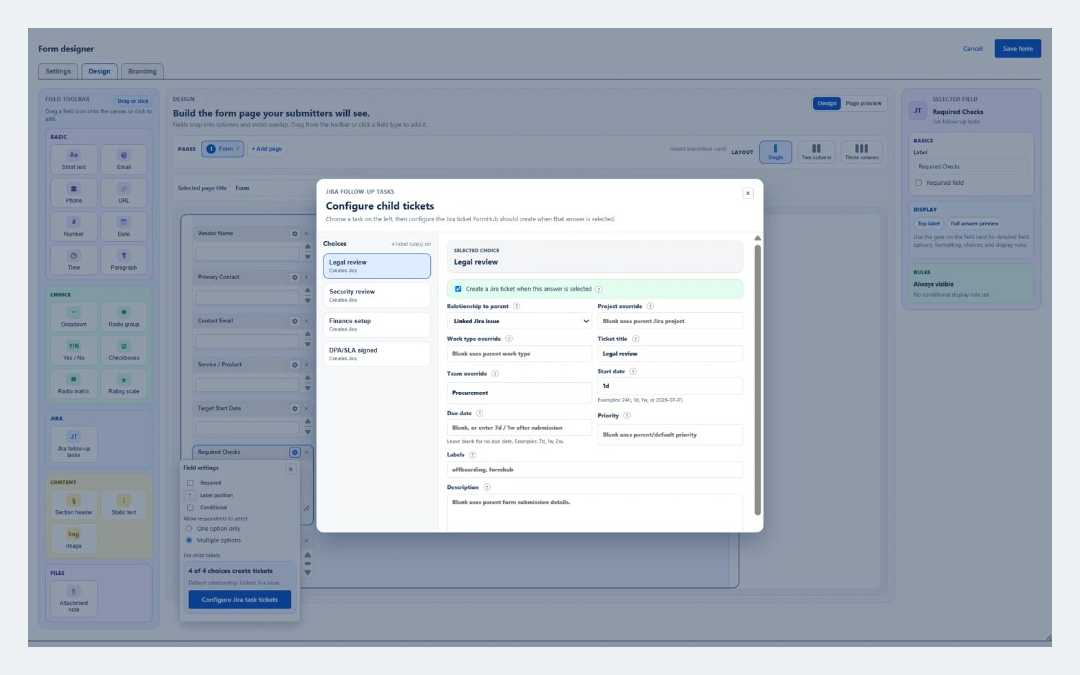
Some submissions need multiple downstream tasks. A Jira follow-up tasks field can create child or linked Jira issues based on the answers the submitter selected.
Form creators and permitted viewers can review responses, export data, and use reports without handing every page viewer access to sensitive submissions.
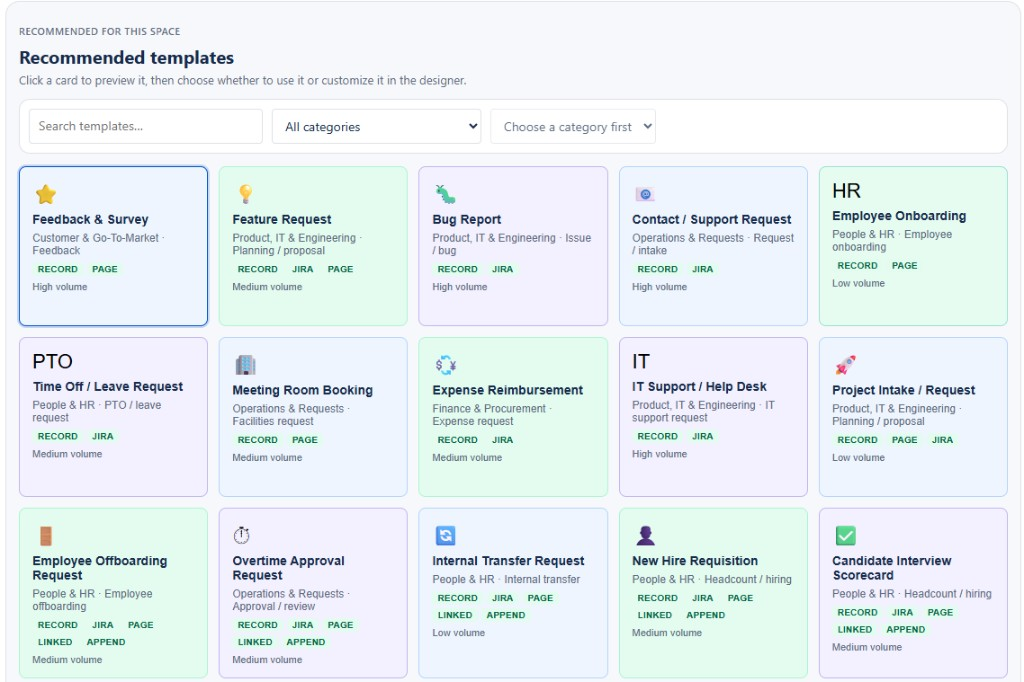
These are not abstract survey examples. They are the kinds of forms teams already run inside Confluence and Jira every day.
Collect the requester, system, urgency, device details, screenshots, and business reason from a Confluence page. Create a Jira issue for the IT team, with priority, labels, due dates, and required fields mapped from the form.
Capture employee details, manager, start or last day, equipment, software access, and special instructions. Create the parent Jira issue, then generate follow-up tasks for IT, facilities, HR, security, and finance based on selected checklist items.
Give teams a consistent way to submit ideas, business cases, requirements, target dates, and impact. Create a Confluence planning page, a Jira issue, or both, so the request becomes a visible piece of work instead of a buried message.
Use FormHub for overtime approvals, travel authorization, facilities requests, purchase requests, and policy exceptions. Keep the request on a Confluence page, restrict response visibility, and route approved work into Jira when needed.
Collect structured details for access reviews, security exceptions, data privacy requests, vendor security reviews, and audit findings. Keep sensitive responses limited to the right viewers while still creating Jira follow-up work for remediation.
Run internal surveys, CSAT, NPS, training evaluations, customer feedback, and process improvement forms from Confluence. Review response tables, export data, and use reports without sending users to a separate survey platform.
Generic form tools are good at collecting answers. Atlassian teams need more than that. They need the answer to become the thing the team can act on.
A submitted form can stay as a response, become a Confluence record, become a Jira issue, create multiple follow-up Jira tasks, or do several of those at once.
That means fewer copy-paste handoffs, fewer incomplete tickets, fewer hidden spreadsheets, and less confusion about where the official record lives.
Scroll horizontally on smaller screens to see all columns.
| Capability | Generic survey tools | Spreadsheets | Manual Jira intake | FormHub |
|---|---|---|---|---|
| Lives directly on a Confluence page | Embedded or linked | No | No | Yes |
| Reusable saved forms and business templates | Partial | No | No | Yes |
| Creates Confluence pages from submissions | No | No | No | Yes |
| Creates Jira issues from submissions | Via integration | No | Yes, manually | Yes |
| Creates multiple follow-up Jira tasks | No | No | Manual only | Yes |
| Response access controlled per form placement | Depends | Manual sharing | No | Yes |
| Reports, exports, and response review | Yes | Manual | No | Yes |
| Designed for Atlassian work artifacts | No | No | Jira only | Yes |
No. FormHub can collect responses and create Confluence records without Jira. Jira becomes important when you want submissions to create trackable work.
Yes. A saved form definition can be inserted into more than one Confluence page. Each page can still have its own macro settings.
Yes. Response and report access can be limited to the creator, admins, and selected viewers. The Confluence page permissions still control who can see the page itself.
The response is stored in FormHub. Depending on the form settings, FormHub can also create a Confluence page, create a Jira issue, append to a Confluence page, or create follow-up Jira tasks.
No. FormHub creates the Jira work with structured context. Jira still controls workflow statuses, transitions, boards, queues, and ownership after the issue is created.
FormHub is built by Churrie Works Inc., a small independent software vendor focused on practical Atlassian apps for teams that run real work in Confluence and Jira.
Install FormHub on a Confluence Cloud site, start from a template, and build forms that do more than collect answers.