WorkPulse-Standard for Jira
Why WorkPulse-Standard?
Everything workers love about WorkPulse-Basic — your assigned issues in one place — plus automatic timers, a billable Time Log you can export, and personal goals. One click. One screen.
Standard is a much beefed-up Basic
WorkPulse-Standard keeps the same focus — open Jira, launch WorkPulse, and every ticket assigned to you is right there — and adds the time-tracking muscle that workers asked for. No manager dashboards, no reporting overhead. Just better tools to get your work done and recorded.
- My Week — the workhorse view: your open issues grouped by project and ordered by due date, ready to update.
- Automatic timers — a shared pool of 300 stopwatch timers per month that log straight to the Jira work log when you stop them.
- Time Log — your week (or month) rolled up by day, with a stats dashboard for entries, total hours, and billable percentage.
- Export anywhere — CSV, Excel, PDF, Word, JSON, plain text, Markdown, and HTML.
- Personal goals — set your required hours and a billable target %, then filter by this week, last week, or this month.
What you get in Standard
A focused work surface for the tickets assigned to you — now with everything you need to record and report your time without leaving the app.
My Week
All your current issues grouped by project and arranged by due date, with issue cards for status, priority, due date, logged time, Later, Park, and the Converse connection.
Automatic timers
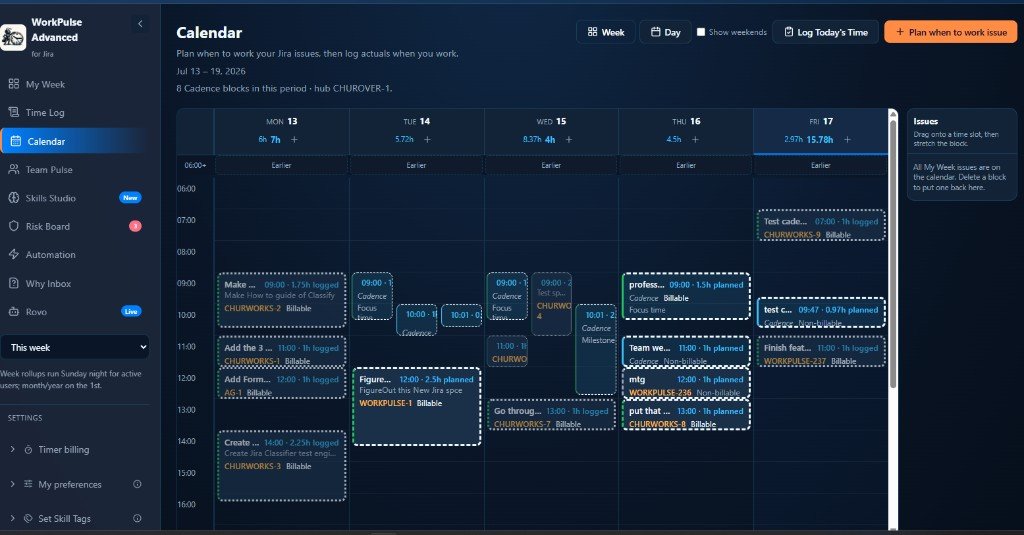
Start a stopwatch on a ticket; stop it and the time records to the Jira work log, the ticket card, the project total, and your weekly time bar. The shared pool shows how many timers are left.
Manual time, three ways
Forgot to start a timer? Use +Log time, the in-card +Time button, or Quick log time. Each entry lands in WorkPulse and in the ticket's Jira work log.
Time Log & export
A weekly or monthly rollup broken out by day, with billable totals and a stats dashboard — exportable to CSV, Excel, PDF, Word, JSON, text, Markdown, or HTML.
Personal goals & filters
Set required hours and a billable target percentage, default new entries to billable, and filter your view by this week, last week, or this month.
Stays on Atlassian
Time lives in Jira work logs and context stays in your tools. With Converse installed, you can keep ticket conversations in Confluence too.
Basic or Standard?
Stay on WorkPulse-Basic if…
- You mainly need your assigned issues in one place to update status and log time.
- You don't need timers, billable tracking, or exportable time reports.
Choose WorkPulse-Standard if…
- You track time with timers and need it logged to Jira automatically.
- You report billable hours and want a weekly/monthly Time Log you can export.
- You want personal goals and filters without manager-style reporting overhead.
How to try it
Take WorkPulse-Standard for a spin on your Jira Cloud site. Open Jira, go to Apps, and select WorkPulse to see your tickets ready to work — with timers and the Time Log built in.
Start with the Fast Track GuideQuestions teams usually ask
How are the timers limited?
Do I have to use timers to log time?
What formats can I export the Time Log to?
Ready?
Read the WorkPulse-Standard documentation