Team coverage calendar for Jira
Timeaway’s team coverage calendar is a shared leave and on-call view inside Jira. Team leads, scrum masters, and on-call coordinators see approved PTO, pending requests, and weekly on-call assignments on one roster — before they assign sprint work or approve another vacation.
The problem
Leads plan sprints in Jira but learn someone is out from a DM on Monday. Capacity looks full in the backlog; coverage is not. Spreadsheets and Slack threads do not show who is actually available or who holds the pager this week.
How Timeaway helps: the team calendar shows approved leave, pending requests, and on-call rows beside the people you already work with in Jira — no export to a separate PTO tracker.
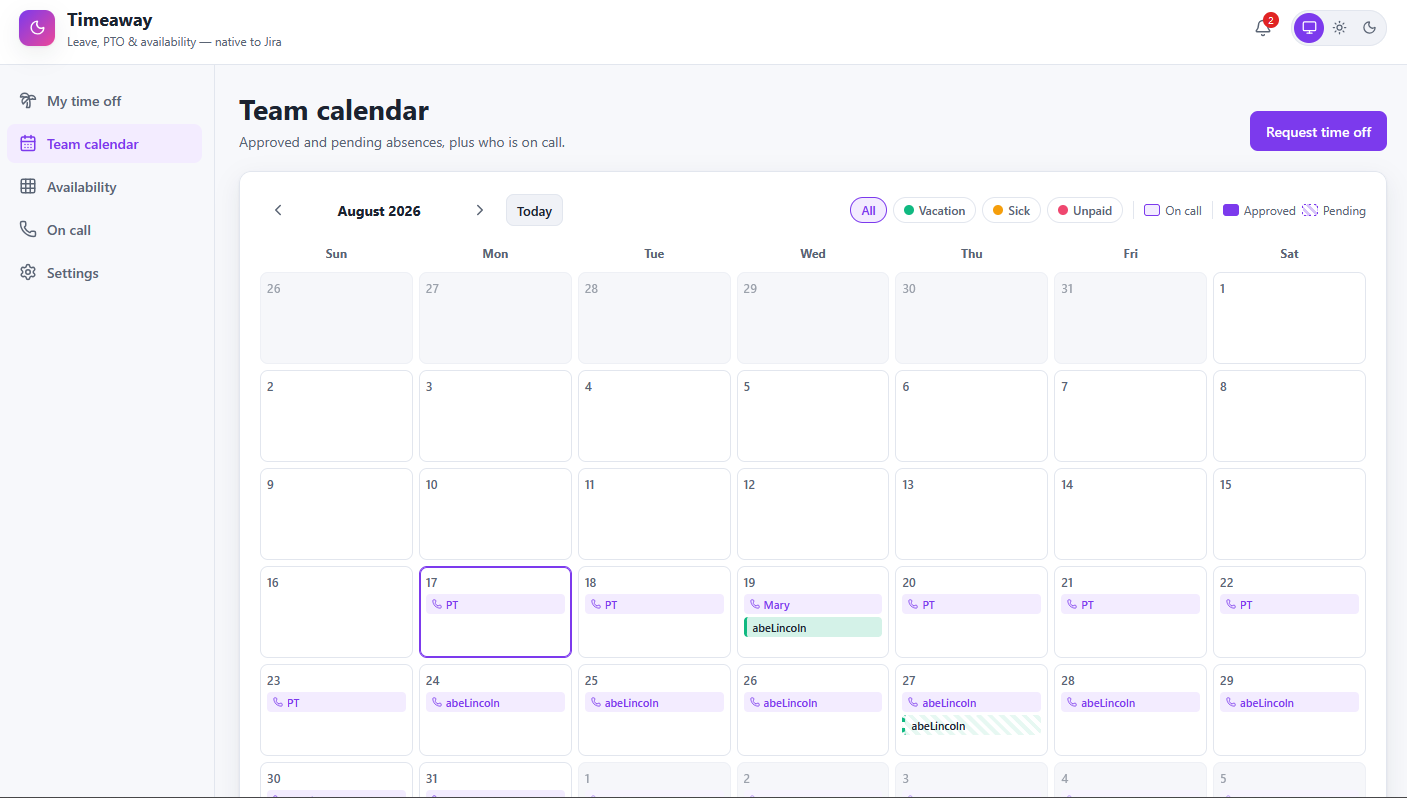
What is the Timeaway team coverage calendar?
It is the Team calendar screen in Timeaway for Jira. Each Timeaway team gets a month (or week) grid with one row per person. Color blocks show when someone is out; a stripe or badge shows who is on call for that week. The data comes from approved and pending leave requests plus the on-call schedule — not from manual spreadsheet updates.
If you are comparing tools, this is the feature teams search for as a Jira PTO calendar, team leave calendar, or on-call roster in Jira. Timeaway keeps all three in one place.
Who uses the team calendar
- Team leads and managers — check coverage before approving PTO or assigning critical work
- Scrum masters and project leads — plan sprints and releases when enough people are IN
- On-call coordinators — see leave overlapping with pager duty and chase handoffs early
- Individual contributors — know who is around before they ping someone on vacation
Leave, pending requests, and on-call in one view
- Approved leave — solid blocks for PTO, sick, and other leave types your org configured
- Pending requests — amber or outlined blocks so you know coverage might still change
- On-call assignment — weekly on-call row per person when the team has on-call enabled
- Same roster as heatmap and approvals — one source of truth across Timeaway screens
For a density view across many weeks, open the availability heatmap. For swap workflows, see on-call handoffs.
How to open the team calendar in Jira
- In Jira, open Apps → Timeaway.
- Go to Team calendar.
- Select your Timeaway team from the dropdown.
- Scan the month — green or solid blocks are approved leave, amber is pending, on-call shows per week.
- Before assigning hot work, confirm the assignee is IN and not the backup on call unless intended.
New to setup? Start with Get started — site admins create the Jira lead group; leads create teams and add members.
Plan sprints and assignments with real availability
Use the calendar during sprint planning, release scheduling, and on-call rotation reviews:
- Before pulling a story into the sprint, check whether the assignee has approved leave that week
- When three people requested the same week off, open the heatmap to see the cliff before you approve
- Pair with Cadence when you plan the week in calendar and goals context
- Publish the availability feed when Capacita or other TimeSuite apps read headcount on your site
Related Timeaway guides
Request PTO
Balances, deliverables, and approval workflow.
On-call handoffs
Swap pager duty with teammate and lead approval.
Availability heatmap
Spot thin weeks across the whole roster.
Use case
PTO and team coverage in Jira.
Common questions
Does Jira include a built-in team PTO calendar?
Jira tracks work items, not org-wide leave balances and on-call rosters. Timeaway adds a team coverage calendar, approvals, and policies native to Jira so leave and on-call live next to the work.
Can I see pending time-off requests on the calendar?
Yes. Pending requests appear differently from approved leave so leads can plan before final approval.
How does on-call show on the team calendar?
When a team has on-call enabled in Settings, the calendar includes weekly on-call assignments alongside leave. Handoffs and swaps are managed in On-call.
Is this the same as Cadence time off?
Cadence Advanced includes light time-off on its calendar. Timeaway is the dedicated leave app — balances, policies, heatmap, deliverables, and on-call built for HR-grade PTO. See the FAQ.
Where do I install Timeaway?
Install from the Atlassian Marketplace, then follow Get started. You can also review the Timeaway product page for an overview.