

Sync Connection Explanation
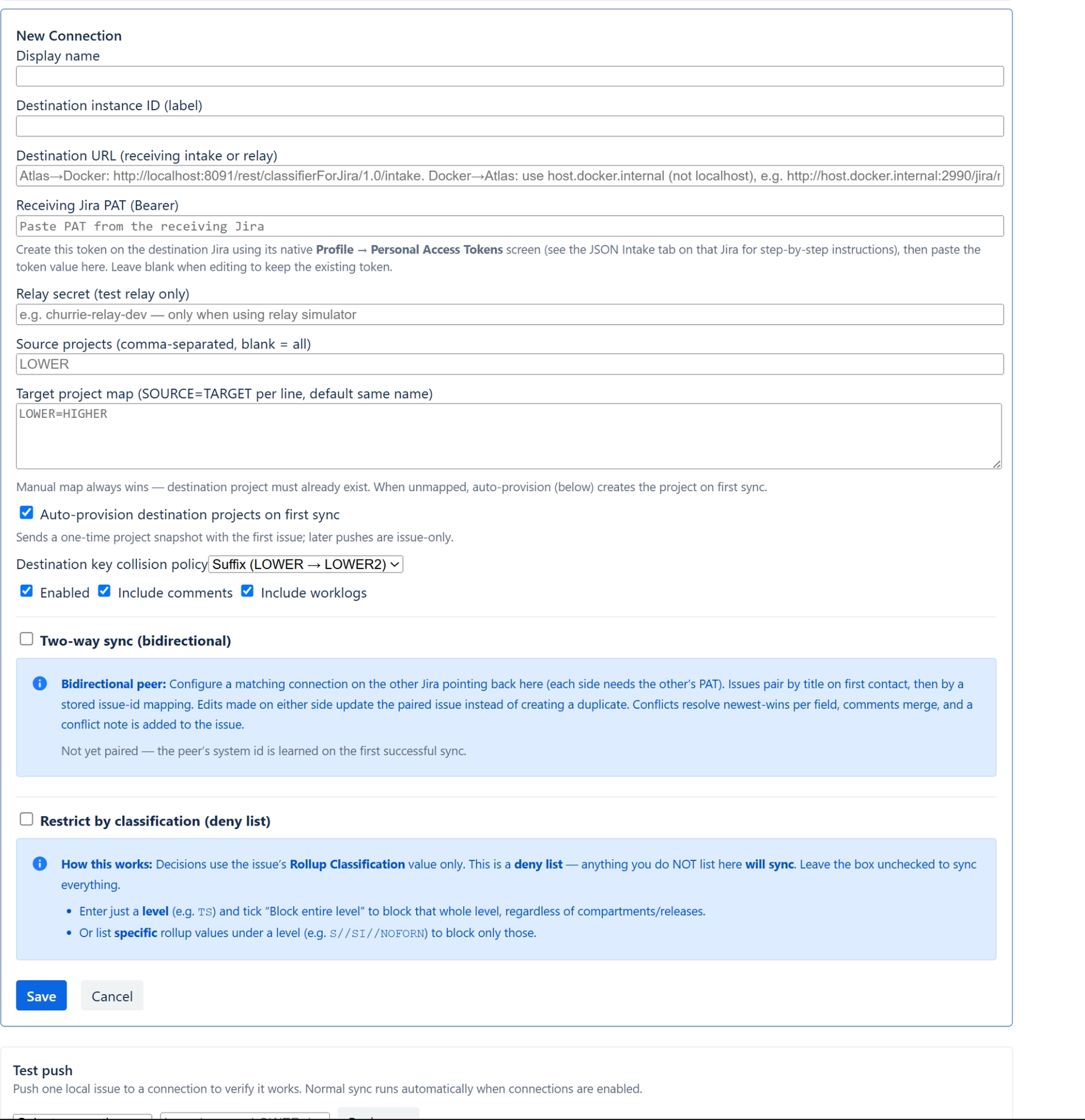
| Label | What it is / used for | Example |
|---|---|---|
| Display name | Friendly name for this connection in the admin UI and connection lists. Not sent to the remote Jira. | Production higher side |
| Destination instance ID (label) | Short label for the remote Jira instance. Stored on synced payloads as the correlation system id so the receiver knows which peer sent the issue. | prod-b |
| Destination URL (receiving intake or relay) | Full URL where this Jira POSTs sync JSON. Usually the Sync intake endpoint on the receiving Jira; can be a dev relay URL instead. | http://higher.example.com/rest/classifierForJira/1.0/intake |
| Receiving Jira PAT (Bearer) | Personal Access Token created on the destination Jira. Sent as Authorization: Bearer … on every outbound push. Leave blank when editing to keep the existing token. | Paste token from destination Jira → Profile → Personal Access Tokens |
| Relay secret (test relay only) | Optional header value when the destination URL points at the dev relay simulator, not a real Jira. Ignored for normal Jira-to-Jira connections. | churrie-relay-dev |
| Source projects | Comma-separated list of local project keys whose issues should sync over this connection. Blank means all projects on this Jira. | LOWER, STAGING |
| Target project map | Maps each source project key to the project key on the destination. One SOURCE=TARGET pair per line. Manual map wins over auto-provision. | LOWER=HIGHERSTAGING=STAGE2 |
| Auto-provision destination projects on first sync | When checked, the first sync for an unmapped source project sends a one-time project bootstrap snapshot so the destination can create the project (fields, schemes, classifier setup). Later syncs send issues only. | Checked (default) |
| Destination key collision policy | What to do if the desired destination project key already exists when auto-provisioning. Suffix picks an alternate key; Fail stops and reports an error. | Suffix (LOWER → LOWER2) |
| Enabled | Master on/off for this connection. When unchecked, no issues are pushed to this destination. | Checked |
| Include comments | When checked, issue comments on the source are included in the sync payload and merged on the destination. | Checked |
| Include worklogs | When checked, worklogs on the source are included in the sync payload and merged on the destination. | Checked |
| Two-way sync (bidirectional) | When checked, this destination is a peer: inbound sync from that system updates paired issues instead of always creating new ones, and edits here can route back to the peer’s issue. Requires a matching connection on the other Jira. Peer system id is learned automatically (read-only when editing). | Checked for prod ↔ prod; unchecked for one-way fan-out |
| Restrict by classification (deny list) | When checked, sync is filtered by Rollup Classification using a deny list. Anything not listed still syncs. When unchecked, all non-opted-out issues in scope sync regardless of classification. | Unchecked = sync everything; checked = block sensitive rollups |
| Level (deny rule) | Classification level abbreviation for a deny rule. Compared against the issue’s rollup level. | TS |
| Block entire level (deny rule) | When checked, blocks every rollup under that level. When unchecked, only the specific rollups listed below are blocked. | Checked = block all TS; unchecked = block only listed values |
| Specific rollup values to block (deny rule) | One full rollup string per line. Used only when “Block entire level” is unchecked. Matching issues are not pushed on this connection. | S//SI//NOFORNS//NF |
Jira Sync -- Connection form field
Reference for the Edit/New Connection form on the Classifier Bridge for Jira Jira Sync admin page
Notes
- Peer system id is not entered manually; it appears after pairing when two-way sync is enabled.
- Test push (below the connection list, not in this form) verifies a connection by pushing one local issue.