
9. Confirm company currency and budget basis
Feature summary
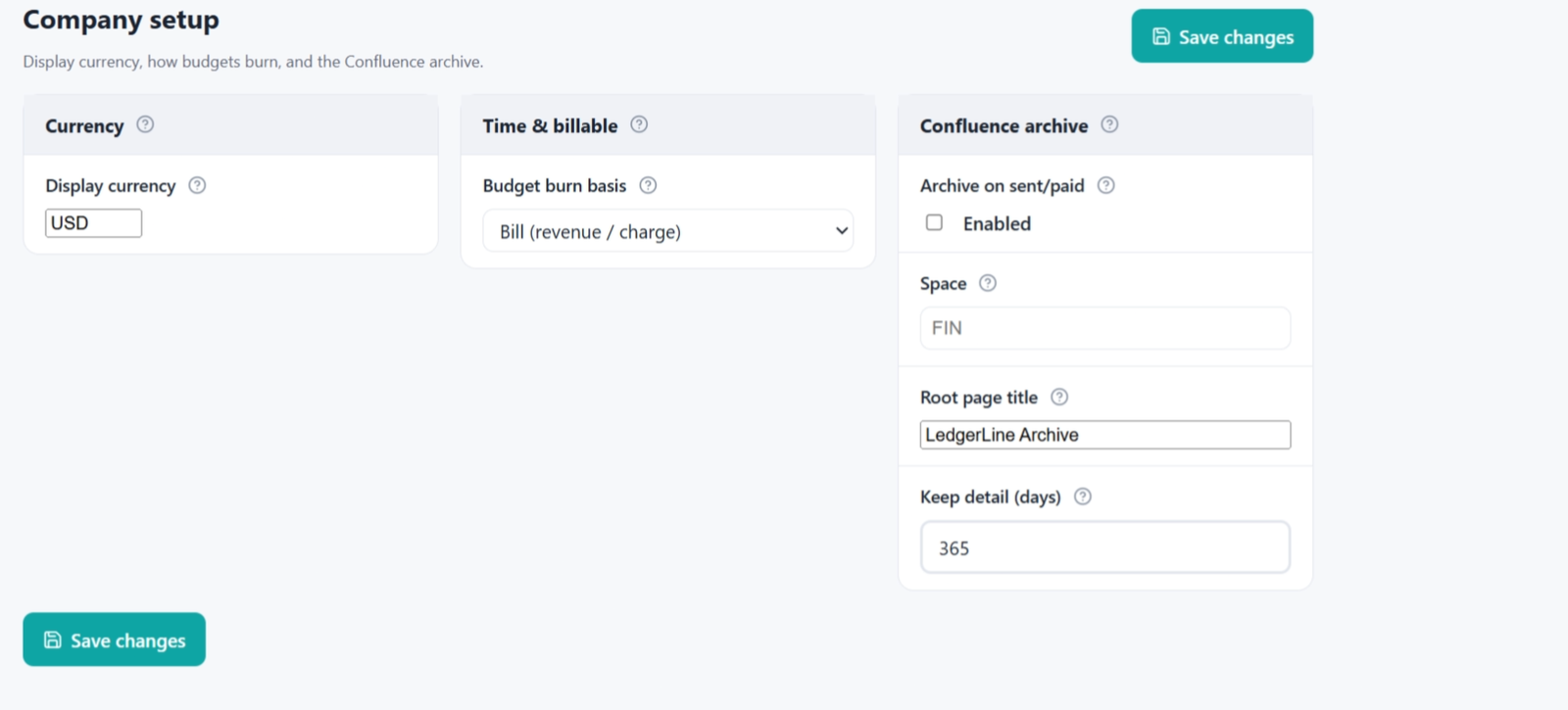
Company setup can be found on settings. page with three short cards: currency, how budgets burn, and the Confluence archive. Confirm the first two before you trust dashboard totals. These will be the default values through out Ledger Line.
When to use it
Use this as step 9. A display currency is required. Budget burn basis has a default, but you should confirm it. The archive is optional, but if you have compliance or want to have one spot to locate past invoices, set the confluence space.
How to use it
Open Settings, then Company setup.
On Currency, set the display currency to the ISO code you want on org rollups, such as USD, CAD, or EUR.
On Advanced, if projects use more than one currency, add a conversion factor for each other code. The factor is how many units of that currency equal 1 unit of the display currency.
On Time & billable, choose the budget burn basis.
Bill — budgets burn on the sold or charge value.
Cost — budgets burn on internal labor spend.
Hour budgets always use logged hours. A project can override this default.
Choose Save changes.
Optionally, on Confluence archive, turn on Archive on sent/paid, choose the Confluence space, the root page title, and how many days to keep full invoice detail in LedgerLine (30 to 730). Save again.
Archiving publishes the invoice under the project's archive page when it is marked sent or paid. It is long-term storage. It is not the accounting handoff.
Screenshots
Related
The required setup is complete when this page is saved and the earlier steps are done. Continue with Read the dashboard or Your first invoice.
Tax regions and the letterhead are optional and are covered in Reference.