
Reports
Feature summary
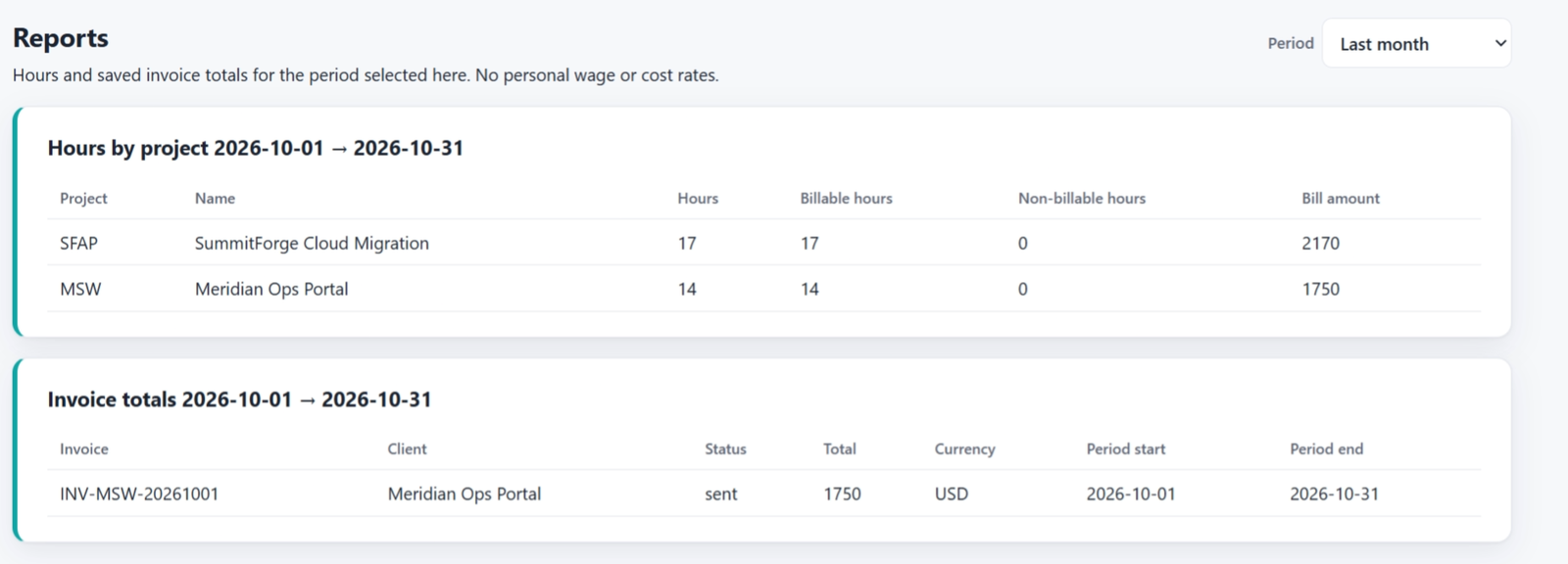
Reports show two tables for the period you select: hours by project, and invoice totals. They load when you open the page and when you change the period. You do not have to click a card first.
When to use it
Use reports when you need a list to export or review, rather than the dashboard charts. LL Administrators, LL Managers, LL Executives, and LL Report Generators can run them.
How to use it
Open Reports.
Choose the period. If you choose a custom range, set the start and end dates.
Read Hours by project. Rows are limited to projects configured in LedgerLine, and to clients the viewer is allowed to see. An empty period says Nothing in this period.
Read Invoice totals. A saved invoice is listed when its period overlaps the range you picked. Credit notes are left out. The row shows the invoice number, client, status, and total.
On Advanced, any extra report template is a separate button. Run it when you need that extra cut.
If hours you know were logged do not appear, check two things. The work was logged inside the period, and the Jira project is listed under Projects. Time in a space you never added is ignored.
Screenshots